




Shopping Cart Abandonment: 10 Reasons & Solutions
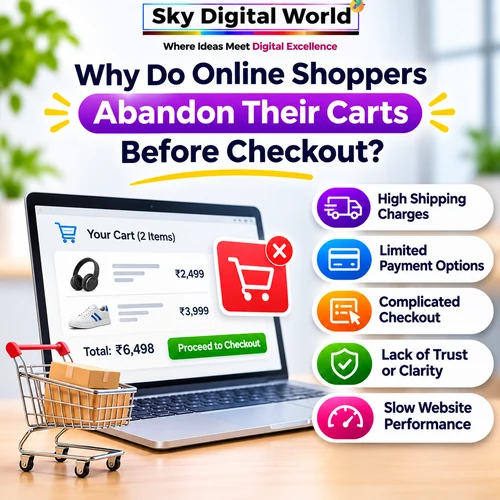
Why Do Online Shoppers Abandon Their Carts Before Checkout?
Imagine a customer visiting your online store, exploring different products, reading descriptions, and finally adding something to their shopping cart.
Everything seems perfect. The customer likes the product, the price looks reasonable, and they appear ready to purchase.
But suddenly, they leave your website without completing the order.
For an e-commerce business owner, this can be frustrating. After investing in website development, product photography, SEO, and digital advertising, losing a potential customer at the final stage feels like a missed opportunity.
This situation is known as shopping cart abandonment, and it is a common challenge for online businesses.
The good news? Understanding why customers abandon their carts can help you identify problems, improve the shopping experience, and recover potential sales.
Let’s explore the most common reasons shoppers leave before
checkout and what businesses can do about them.

What Is Shopping Cart Abandonment in E-commerce?
Shopping cart abandonment happens when a customer adds products to their online shopping cart but leaves the website without completing the purchase.
For example, imagine your Shopify store receives 200 shopping carts in a week, but only 70 result in completed orders.
That means 130 carts were abandoned.
The cart abandonment rate is calculated using this formula:
\[ \text{Cart Abandonment Rate}=\left(1-\frac{\text{Completed Orders}}{\text{Carts Created}}\right)\times100 \]
Cart Abandonment Calculator
Shopping carts created
Completed orders
65.0%
Cart abandonment rate
130 abandoned carts
Illustrative calculation. Use consistent cart and order definitions when measuring your store.
Not every abandoned cart represents a lost customer. Some visitors are comparing prices, saving products, or exploring options before making a decision.
However, repeated abandonment can also indicate problems with pricing, delivery, checkout usability, or customer trust.
1. Unexpected Shipping Charges and Additional Costs
One of the most frustrating experiences for online shoppers is discovering unexpected charges at checkout.
A product might appear affordable on its page, but the final amount increases after adding shipping fees, taxes, or handling charges.
For example, a customer adds a ₹999 product to their cart. At checkout, the total becomes ₹1,249 because of additional charges.
Even if those charges are legitimate, the unexpected increase may cause hesitation.
How businesses can improve:
- Display shipping charges or estimates before checkout.
- Clearly explain applicable taxes and fees.
- Provide a delivery cost calculator where useful.
- Offer free shipping thresholds when financially practical.
Transparent pricing helps customers understand the actual cost before they commit to buying.
2. Complicated and Lengthy Checkout Processes
Customers generally want a convenient shopping experience.
If checkout requires too many steps, unnecessary forms, or repeated information, shoppers may lose patience.
Imagine being asked to create an account, verify an email address, enter several personal details, and navigate multiple pages just to purchase one product.
This creates unnecessary friction.
A smoother checkout should ask only for information required to process the order.
Useful improvements include enabling guest checkout where available, using address autofill, reducing unnecessary form fields, and displaying clear progress indicators.
For Shopify stores, merchants should review available checkout settings and test the customer journey on both desktop and mobile devices.
3. Customers Are Forced to Create an Account
Some shoppers prefer not to register before purchasing.
They may be first-time visitors who want to try a product without committing to a new account.
Mandatory registration can make a simple purchase feel complicated.
Allowing guest checkout gives customers more flexibility.
Businesses can still invite shoppers to create an account after purchase by explaining useful benefits such as faster future checkout or easier order tracking.
The key is to make registration helpful rather than an obstacle.
4. Limited Payment Options
Customers have different payment preferences.
Some prefer debit or credit cards, while others use UPI, digital wallets, or other locally available payment methods.
If shoppers cannot find a payment option they trust or regularly use, they may leave without purchasing.
Businesses should consider their target market when selecting payment methods.
For an Indian e-commerce store, UPI and cards may be important. Stores serving international customers may need additional payment options supported in their operating regions.
Display accepted payment methods clearly and ensure the payment gateway works reliably.
5. Slow Website Loading and Technical Problems
A slow or unreliable website can interrupt the buying process.
Customers may abandon checkout when pages take too long to load, payment buttons stop responding, or error messages appear repeatedly.
These problems become especially frustrating when shoppers have already entered their details.
Regular website testing is essential.
Check page loading performance, payment gateway functionality, mobile responsiveness, coupon application, and cart updates.
Tools such as Google PageSpeed Insights can help identify performance issues, while analytics and error monitoring can reveal problems in the purchase journey.
6. Unclear Delivery Dates and Shipping Policies
Before placing an order, customers often want to know when their products will arrive.
A vague message such as “Delivery Soon” may not provide enough information.
Shoppers purchasing gifts, event supplies, or urgent essentials may hesitate when delivery timelines are uncertain.
Businesses can improve transparency by displaying estimated delivery windows, shipping locations, delivery methods, and tracking availability.
Avoid promising unrealistic delivery times simply to encourage purchases.
Accurate expectations help create a better post-purchase experience.
7. Lack of Trust in the Online Store
Customers may hesitate to share payment information with an unfamiliar website.
Missing contact details, unclear return policies, suspicious product claims, or poorly designed checkout pages can create doubts.
A trustworthy e-commerce website should provide genuine business information and accessible customer support.
Display clear return and refund policies, secure payment information, and authentic customer reviews where available.
Avoid fake testimonials, misleading countdown timers, or unsupported security claims.
Building customer trust is particularly important for new online stores.
8. Customers Are Still Comparing Products and Prices
Not every customer who adds a product to their cart intends to purchase immediately.
Some shoppers use carts as temporary wishlists.
Others compare similar products across multiple websites before deciding.
For example, a customer researching headphones might add products to three different online stores to compare pricing, specifications, warranties, and delivery options.
Businesses cannot eliminate this behaviour entirely.
However, detailed product descriptions, competitive offers, transparent policies, and useful comparison information can help customers make decisions more confidently.
9. Poor Mobile Checkout Experience
Many customers browse online stores using smartphones.
If your checkout is difficult to use on a smaller screen, potential buyers may leave.
Common mobile problems include tiny buttons, complicated forms, unreadable text, and pop-ups that cover important information.
Mobile checkout should be simple, responsive, and easy to navigate.
Make sure customers can select payment methods, enter addresses, review orders, and complete purchases without excessive scrolling or zooming.
Testing checkout on actual mobile devices can reveal problems that desktop previews may miss.
10. Confusing Return and Refund Policies
Customers may hesitate when they do not understand what happens if a product arrives damaged, does not fit, or fails to meet expectations.
A clear return policy helps shoppers understand their options.
Businesses should explain return eligibility, timelines, refund methods, exchange conditions, and any applicable restrictions.
Keep important policies accessible from product pages, shopping carts, and checkout screens.
Clear policies reduce uncertainty and help customers make informed purchases.
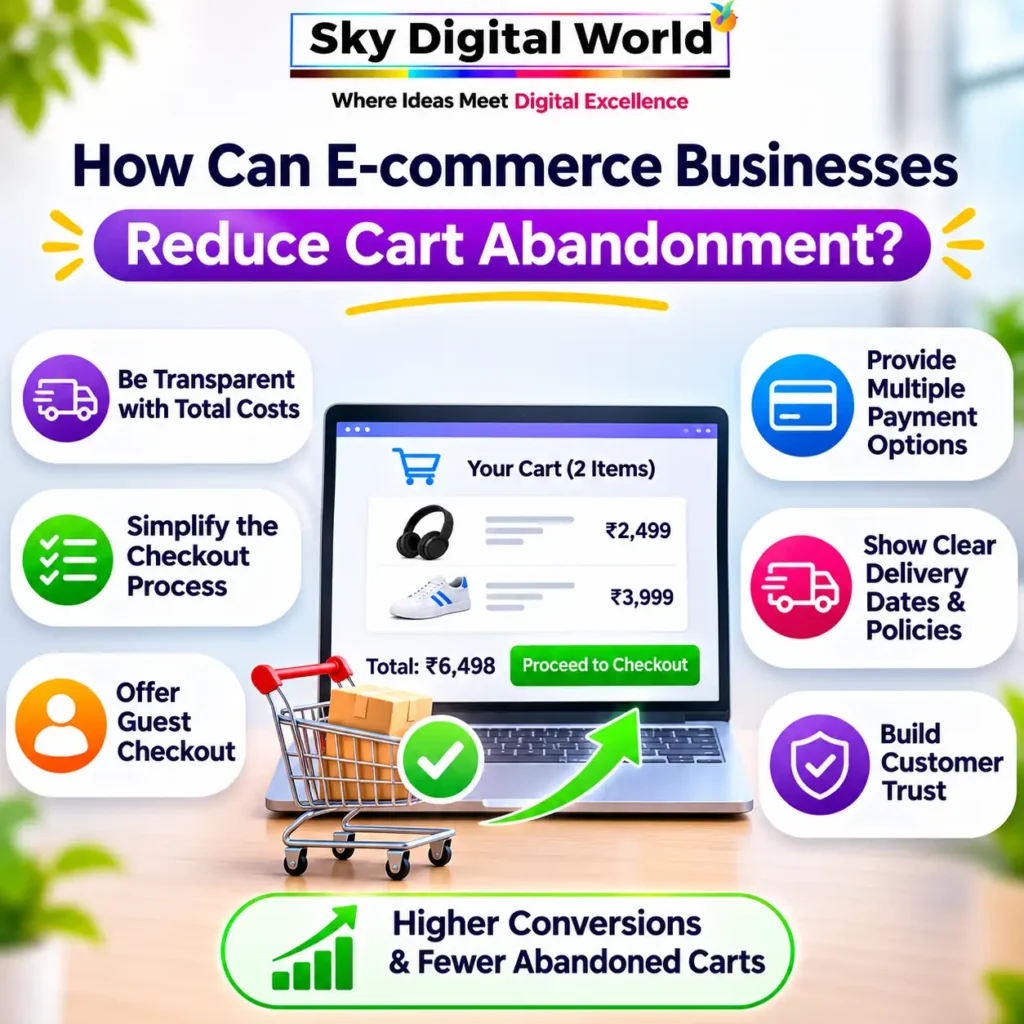
How Can E-commerce Businesses Reduce Cart Abandonment?
Reducing abandonment requires improving the complete shopping experience rather than relying on one solution.
Here is a practical checklist:
Common Problem | Recommended Improvement |
Unexpected charges | Show total costs clearly |
Complicated checkout | Reduce unnecessary steps |
Mandatory registration | Offer guest checkout |
Limited payments | Add relevant payment methods |
Slow website | Improve loading performance |
Unclear delivery | Display estimated delivery dates |
Low customer trust | Add genuine trust information |
Mobile usability issues | Optimize mobile checkout |
Unclear return policies | Explain conditions transparently |
Businesses should prioritize improvements based on actual customer behaviour and checkout data.
Can Abandoned Cart Emails and WhatsApp Messages Recover Sales?
Yes, abandoned cart reminders can encourage some customers to return and complete their purchases.
For example, an online store may send a reminder containing the products left in the cart and a link to resume checkout.
A helpful message could say:
Still thinking about your purchase? Your selected products are waiting in your cart. Complete your order whenever you’re ready.
Some businesses also use personalized offers, but discounts should not be the default solution for every abandoned cart.
Important: Email and WhatsApp recovery messages should follow applicable consent requirements, messaging policies, and privacy regulations.
Shopify merchants can explore compatible abandoned checkout automation features and marketing tools.
How Can Businesses Track Cart Abandonment Using Analytics?
Understanding where customers leave is essential for improving checkout performance.
Google Analytics 4 can help businesses analyze e-commerce events such as add_to_cart, begin_checkout, and purchase when tracking is correctly implemented.
Compare the number of users who add products to carts with those who begin checkout and complete purchases.
This can help identify whether shoppers are leaving before checkout begins or during the payment process.
However, analytics alone may not explain every reason for abandonment. Combine quantitative data with customer feedback, usability testing, and technical monitoring.
Conclusion
Shopping cart abandonment is a common part of e-commerce, but businesses should not ignore it.
When customers leave before checkout, the reason may involve unexpected charges, complicated forms, limited payment methods, technical issues, or uncertainty about the store.
The most effective approach is to identify friction points and make purchasing easier, clearer, and more trustworthy.
Remember, getting customers to add products to their carts is only part of the journey. Helping them complete the purchase is equally important.
At Sky Digital World, we help businesses develop user-friendly e-commerce websites, optimize Shopify stores, improve shopping experiences, and create digital marketing strategies focused on meaningful business growth.
Want to reduce cart abandonment and improve your online store’s checkout experience? Connect with Sky Digital World for professional e-commerce website development and conversion optimization services.
Frequently Asked Questions
1. What is the main reason customers abandon shopping carts?
There is no single reason for every store. Unexpected costs, complicated checkout, payment limitations, and customer hesitation are common contributing factors.
2. Can free shipping reduce cart abandonment?
Free shipping may encourage purchases, but businesses should evaluate shipping costs and profit margins before introducing it.
3. Does guest checkout help improve conversions?
Guest checkout can reduce registration friction and make purchasing easier for customers who do not want to create an account.
4. Can Shopify stores recover abandoned carts?
Yes. Shopify stores can use supported checkout recovery and marketing automation features to send eligible customers reminders.
5. How can small businesses reduce cart abandonment without offering discounts?
Focus on transparent pricing, fast website loading, clear delivery information, trusted payment methods, and a simpler checkout process.
6. Is cart abandonment the same as checkout abandonment?
No. Cart abandonment generally refers to shoppers leaving after adding products to their cart, while checkout abandonment refers to shoppers leaving after starting the checkout process.
Lorem ipsum dolor sit amet, consectetur adipiscing elit. Ut elit tellus, luctus nec ullamcorper mattis, pulvinar dapibus leo.